Product Page Optimization: How to Run an App Store A/B Test
Someone on your team is sure the screenshots are wrong. Maybe they are. So you swap them, wait a few weeks, and installs are up four percent.
Did the screenshots do that? You genuinely cannot say. And the reason is not that you measured it badly. It is that by the time you looked, there was nothing left to measure against.
This is what Product Page Optimization exists to fix. It is Apple's built-in way of showing two versions of your App Store page at the same time, to comparable people, so that a difference between them actually means something. This post is how to run one: what it can test, how to decide what to put in it, how the traffic gets divided, and how to read what comes back.
Why you can't just change the page and compare
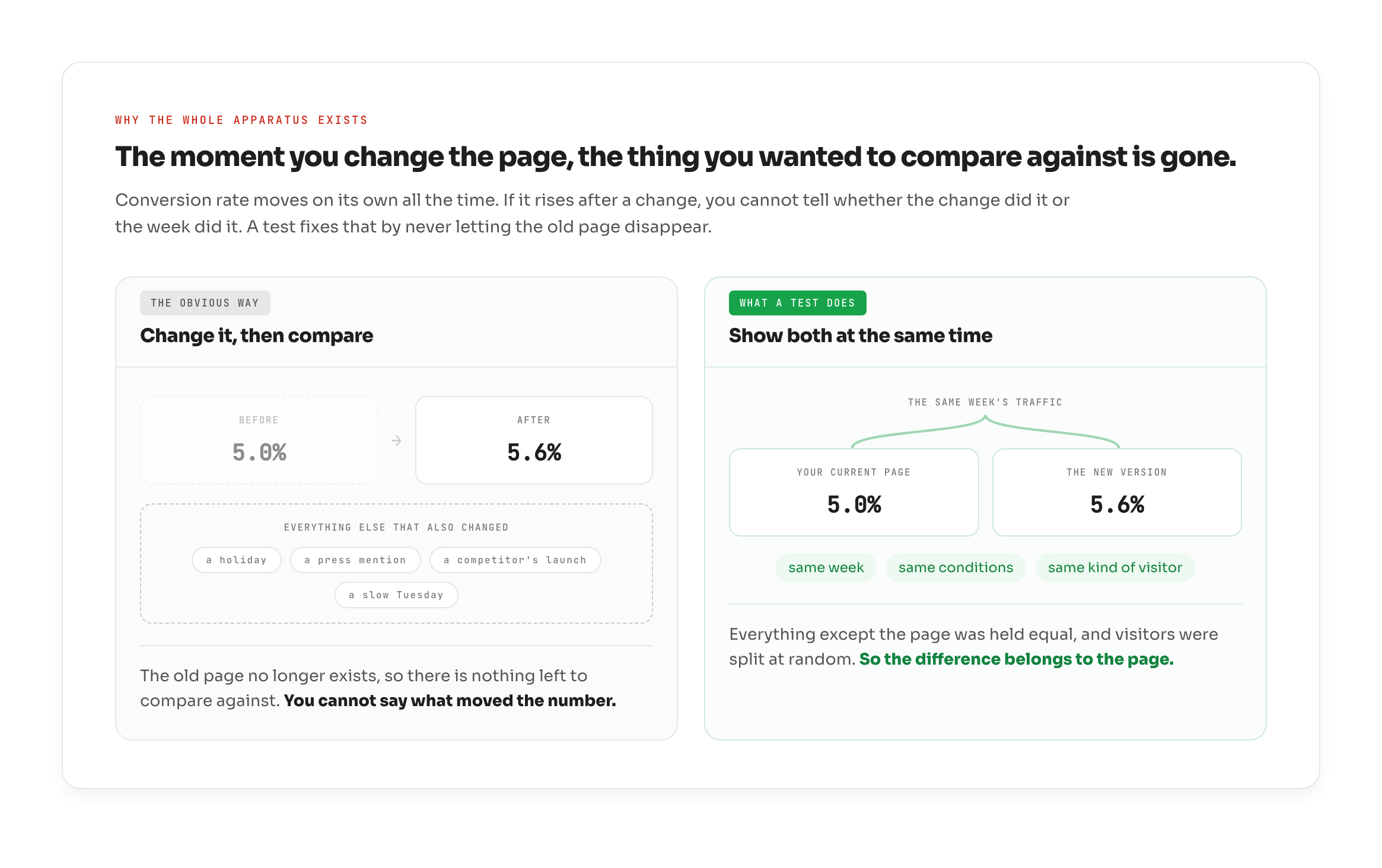
Start with the number every test is trying to move. Your conversion rate is the share of people who land on your product page and go on to download. If 100 arrive and 5 install, that is 5%.
The obvious way to improve it is to change something, wait, and compare the new number to the old one. It does not work, and the reason is worth sitting with, because it is the reason the whole apparatus exists.
The moment you change the page, the old page is gone. There is no version of it still running that you could hold the new one up against. And conversion rate moves on its own all the time: a holiday, a press mention, a competitor's launch, a slow Tuesday. If your rate rises after a change, you cannot separate the change from the week.
An A/B test removes that problem by never letting the old page disappear. It shows your current page and the new version at the same time, to two random slices of the same traffic. Same week, same conditions, same kind of visitor. Everything except the page is held equal, so a difference between them can be attributed to the page.
That is the whole idea, and it is why it works: your current page never stops running. It stays live as the thing everything else is measured against.
What the test can and can't change
The alternate versions are called treatments. You can run up to three of them against your current page, and they can only differ in three things: your app icon, your screenshots, your app previews.
That is the whole list. Your title, subtitle, description and keyword field are not part of it.
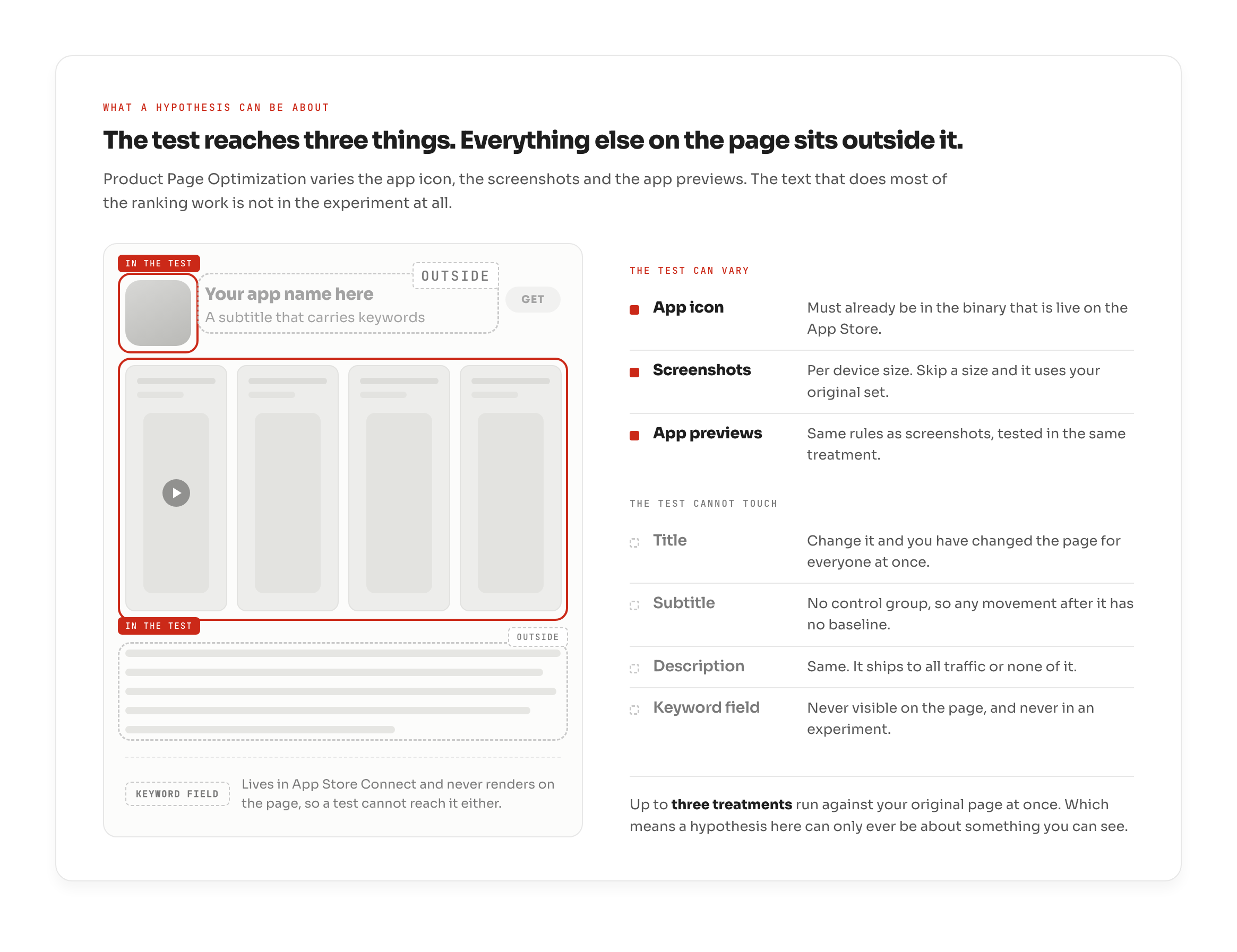
Which means your store page splits into two kinds of change. The visual elements you can prove. And the text you can only ship, watch, and argue about afterwards, because it goes live for everyone at once and leaves you nothing to compare it against.
The icon carries a scheduling cost the other two do not. Any icon you want to test has to already be inside the app binary that is currently live on the App Store, and that version has to be built with an SDK that supports alternate icons in asset catalogs. You cannot decide on a Monday to test an icon this week. You decide a release ahead.
Everything else is lighter than teams expect. Reordering screenshots or previews that are already live needs no resubmission, and neither does switching to an icon already sitting in the binary. New treatment assets have to be approved first, but they can be submitted without shipping a new app version.
One distinction before we go further, because it costs teams more time than any other. Product Page Optimization is not Custom Product Pages. PPO splits the traffic you already receive, and Apple decides who sees which version. A Custom Product Page is one you deliberately send chosen traffic to. Because you chose who arrived, a difference measured on one is not the same kind of evidence.
The hypothesis: one variable, one sentence, one direction
Write the hypothesis before you build anything. One variable, one sentence, one predicted direction.
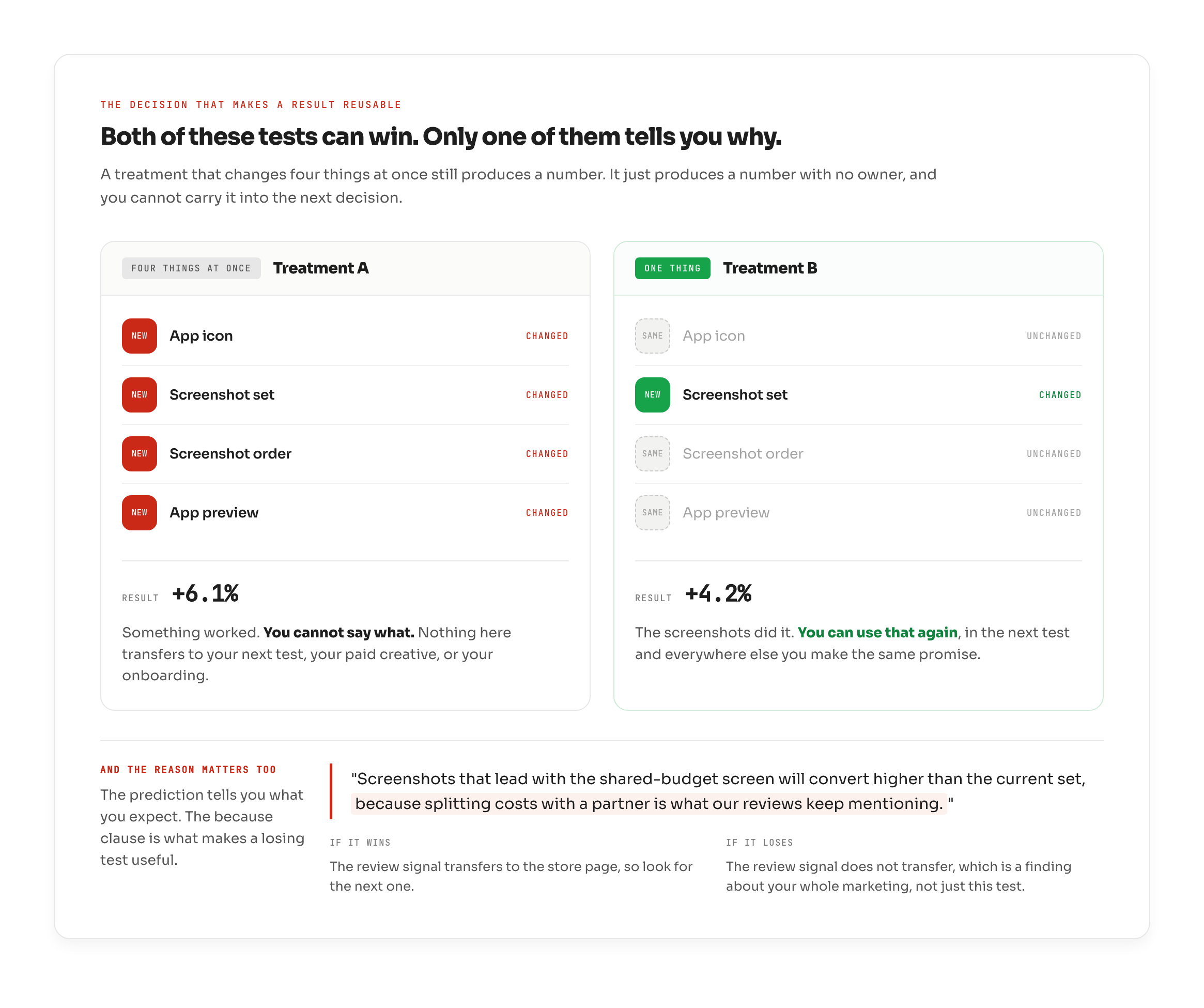
"Screenshots that lead with the shared-budget screen will convert higher than the current set, because splitting costs with a partner is what our reviews keep mentioning."
The reason to keep it that strict is mechanical, not moral. The traffic split is fixed, and the test spends calendar time whether or not it teaches you anything. So a treatment that changes the icon and the screenshots and the order all at once buys you a single answer with no owner. Conversion moved, and you cannot say which of the three moved it. You spent the traffic and the weeks and you own nothing you can reuse.
One variable is the only version of this test that tells you why at the end, instead of just what.
The because clause matters as much as the prediction. Without it, a losing test tells you only that set B did not win. With it, a losing test tells you the signal in your reviews did not transfer to the store page, which is something you can act on everywhere else.
Where the variable comes from
Which leaves the harder question. Where does the thing you are testing actually come from?
Your own instinct is one source, and it is the one most teams use by default. It is also the weakest, because it is a guess about people who are not you.
The second source is your audience, and most of it is not in your reviews. Reviews are only the people who cared enough to come back to the store and write one, which is a small and self-selecting slice. The rest of them are talking somewhere else, describing the problem in their own words, in places nobody on your team is reading. None of it reaches your dashboard, and all of it is closer to how they actually think than anything written in a planning meeting.
Listening to that is its own discipline, and it is one of the things OWA does for you: reading what your audience says about the problem, not only what they say about your app. A phrase that keeps surfacing there is a hypothesis with evidence already attached.
Both of those are still guesses until a test settles them.
There is a third source, and most teams never open it. Your competitors are running these same tests on the same audience, and every test they finish is a hypothesis somebody else already paid to build. You cannot see their results, because the confidence figure Apple gives them never leaves their account. But the test itself is public the moment it opens, because their store page changes.
This is where OWA fits. It watches the pages of the apps you track and marks the day a test appears, then shows their current page against each of their treatments, the share of traffic each one carries, and the dates the test started, ended, and shipped a winner. It reads the winner not from Apple's verdict but by watching which set of assets they actually keep.
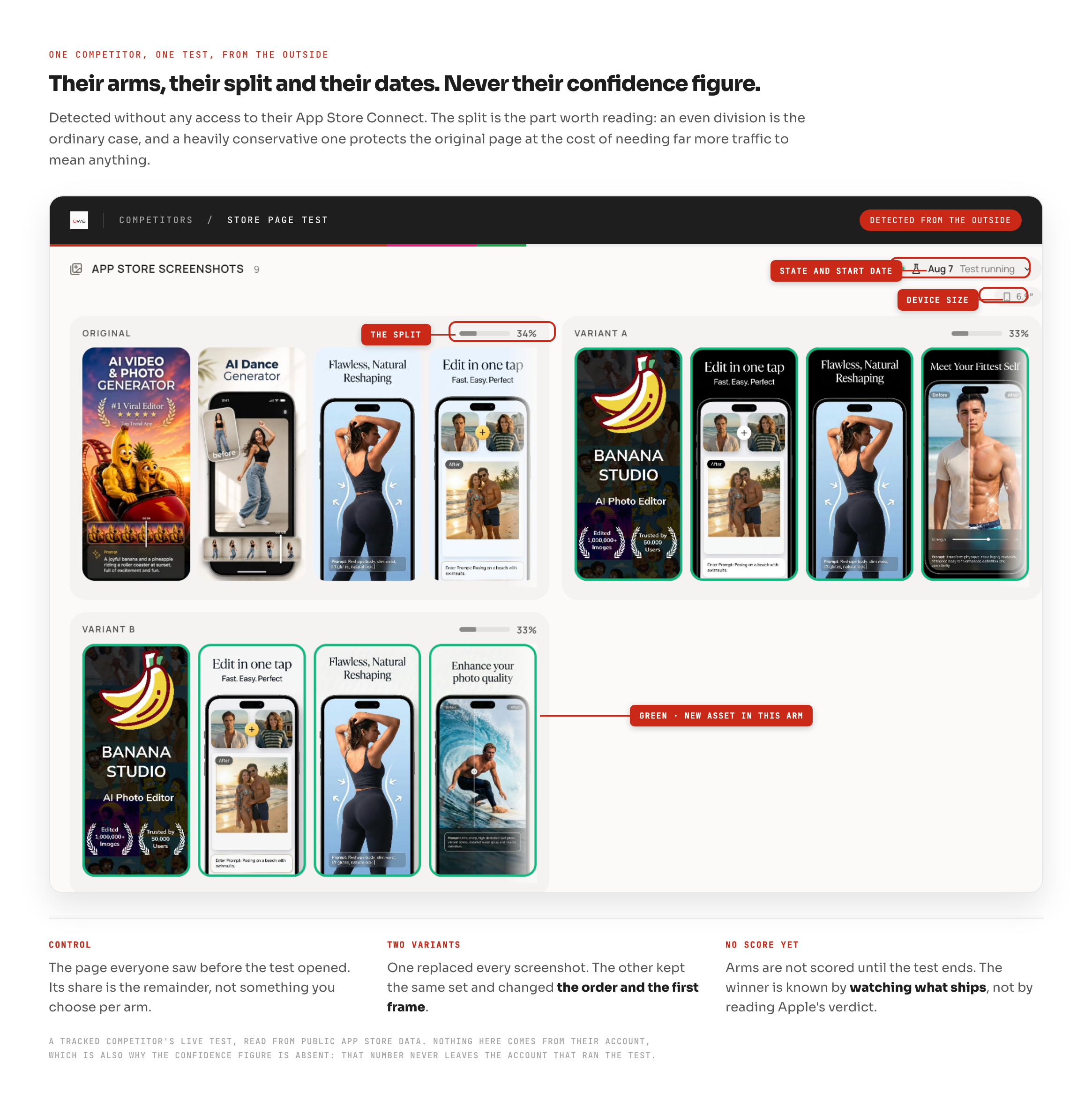
You cannot adopt their winner. Their audience is not yours, and a lift measured on their traffic says nothing certain about yours. But a shipped winner is a direction that already survived a real test, and that is what you build your own hypothesis on, instead of opening an empty document and inventing one.
How the traffic gets split
You decide what share of your page's traffic enters the test. That share is divided evenly across the treatments, and your current page keeps the rest.
Apple's own worked example: allocate 40% of your traffic across two treatments, and each treatment gets 20% while your original keeps 60%.
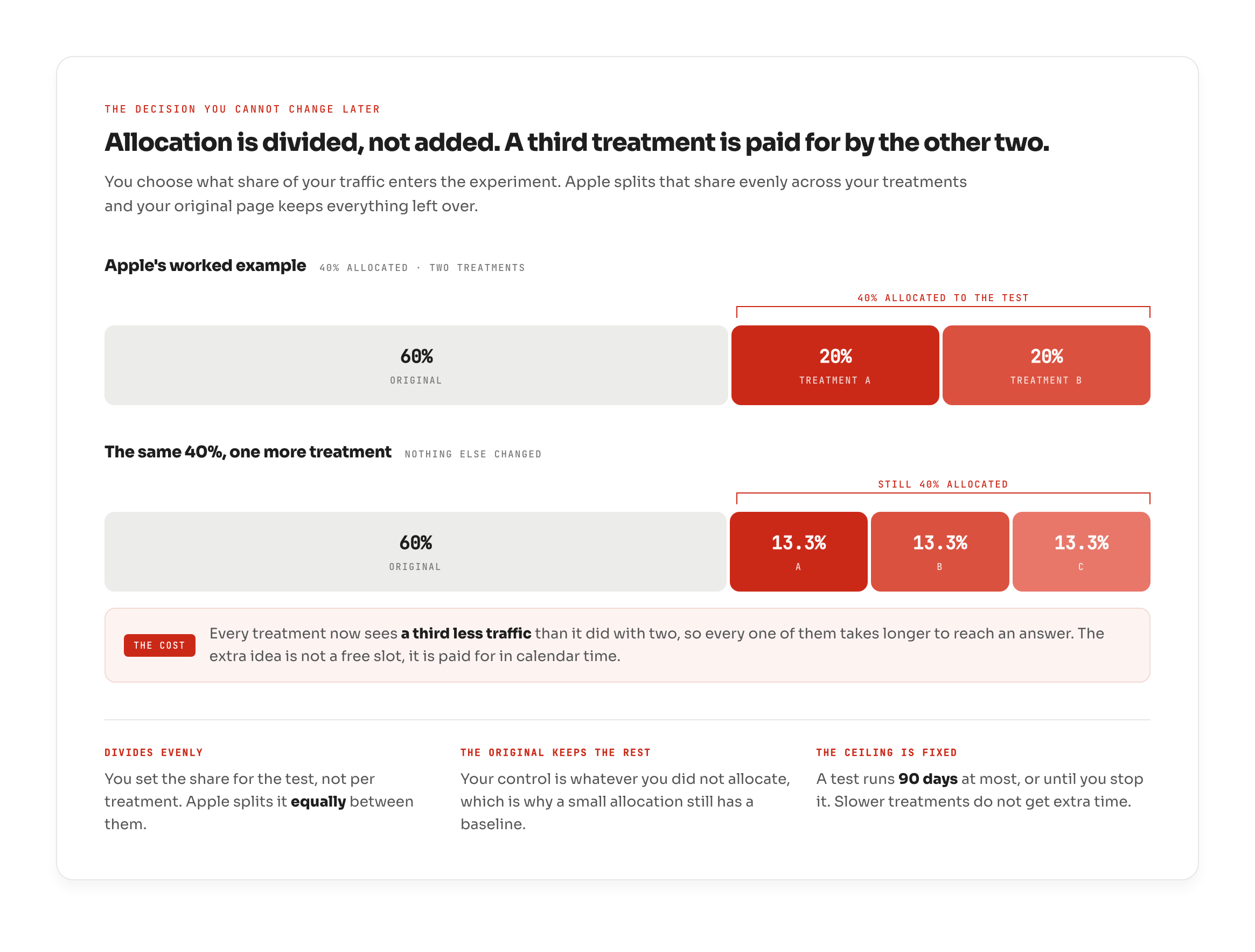
Read that carefully, because it is the part teams misjudge. You set the share for the test as a whole, not per treatment. So more treatments on the same allocation means less traffic each, and less traffic each means a longer wait for any of them to reach an answer. A third treatment is not a free extra slot. It is a real cost, paid in time.
Apple will estimate that time for you before you launch, using your existing daily impressions and new downloads. Run that estimate first. It is the cheapest step in the whole process and it tells you, before you make a single asset, whether this test can finish at all on the traffic you have. The hard ceiling is 90 days, or whenever you choose to stop it.
What Apple tells you at the end
Three numbers, and nothing else. An estimated conversion rate for each version. An estimated relative lift against the baseline you chose. And confidence, as a percentage.
Confidence is the one that decides everything. It is Apple's measure of how sure it is that the difference between your versions is real, rather than an accident of which visitors happened to see which page. It starts low and climbs as more people flow through the test.
At 90%, Apple is satisfied, and it attaches a label to the winner: "Performing Better" or "Performing Worse." Below that line it attaches nothing at all, because it does not yet know.
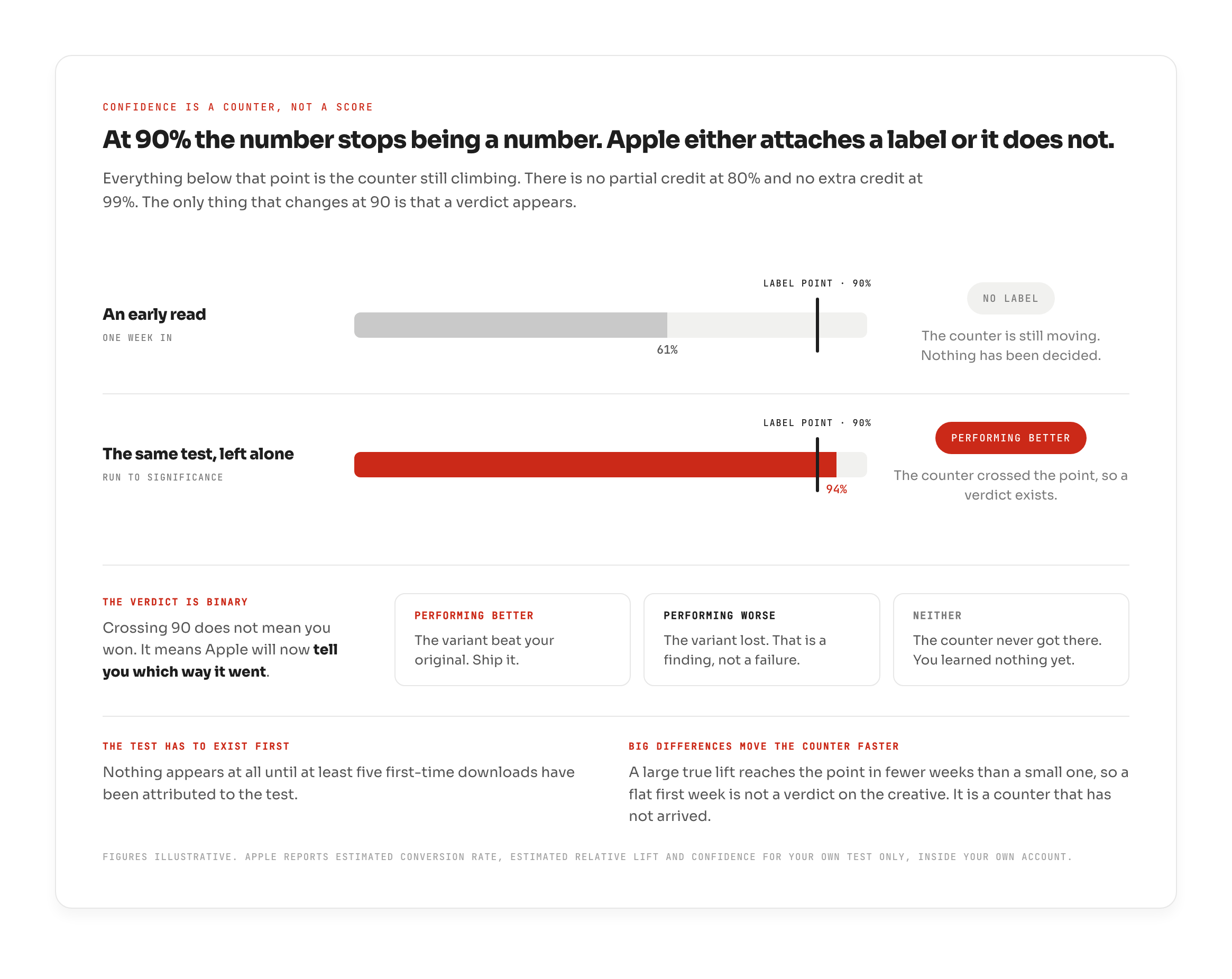
One small thing worth expecting: a test does not appear at all until at least five first-time downloads have been attributed to it. On a smaller app that can mean opening a test and staring at an empty screen for days. Nothing is broken. The counter has not started.
Which one won, and what you do that day
The label is the answer. Not the lift, not the conversion rate, and not the screenshot everyone in the room preferred. There are three ways a test can end, and two of them are results you keep.
Performing Better. The treatment beat your current page. Feature it to everyone.
Performing Worse. Your current page won, which is a finding rather than a failure. You now know a direction that does not work on your traffic, and you learned it without having to ship it.
No label at all. Confidence never reached 90%, so there is no winner to apply. This one is more common than teams expect, and it has its own causes.
Applying a winner is a separate action you take yourself. Apple does not switch the assets on for you. For most tests the work is small, because reordering assets already live, or switching to an icon already in the binary, needs no resubmission. The mistake is assuming it happens by itself. Book the day while the test is still running, and do not open the next test until the winner is actually live, because two changes overlapping is how a clean result becomes an unreadable one.
Ran one and got nothing back?
Everything above assumes your test reaches a verdict. Plenty do not.
A test can run its full ninety days, expire, and hand back two numbers with no label attached. That means it gathered enough traffic to show a difference, but never enough to prove the difference was not luck. It is not a mistake you made while the test was running. It is decided by arithmetic before the test opens, and it is common enough to be worth understanding before you plan the next one.
Why most App Store A/B tests never give you an answer covers what causes it, how to tell in advance whether your test can finish, and what to do instead when it cannot.
FAQ
What can you not test on your App Store page?
Your title, subtitle, description and keyword field are not part of a Product Page Optimization test. Those change for everyone at once, which leaves no control group to compare against, so any movement afterwards cannot be attributed to the change with confidence. In practice this means a large share of what teams call store page optimization has to be decided by judgement and other evidence rather than settled by a test.
What is the difference between Product Page Optimization and Custom Product Pages?
Product Page Optimization splits the traffic you already receive, randomly, and Apple decides who sees which version. That randomness is what makes it a controlled test. Custom Product Pages are a different tool: up to 70 alternate pages per app, each with its own URL, differing in screenshots, previews, promotional text and keywords, that you deliberately send chosen traffic to. Because you chose who arrived, a difference measured on a custom product page is not the same kind of evidence as a test result.
Can you A/B test your app icon on the App Store?
Yes, but it has to be planned a release ahead. Any icon you want to test must already be inside the app binary that is currently live on the App Store, and that version has to be built with an SDK that supports alternate icons in asset catalogs. You cannot upload a new icon straight into a test the way you can with screenshots. Once the icon is in the binary, switching to it inside a test needs no resubmission.
The part that decides everything else
A store page test is not really a design exercise. It is a decision about what you are willing to find out, made before a single asset exists: one variable, a treatment count you can afford to wait on, and a hypothesis written down with its reason attached.
Get that part right and the store will answer you. Get it wrong and it will spend your quarter and tell you nothing.
And when you are deciding what to put in the next one, you do not have to start from a blank page. You can see which of your competitors have a test running right now, free to start.